
IngramSpark says your file is not PDF/X-1a:2001 compliant
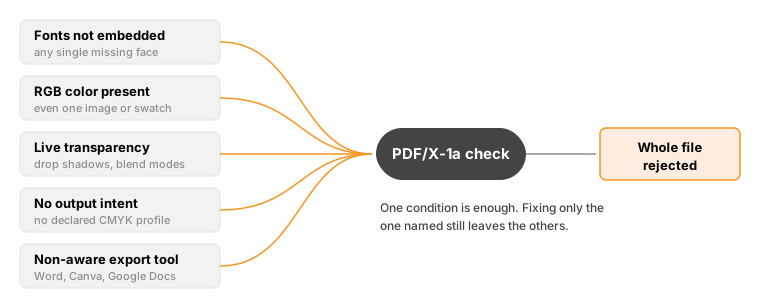
PDF/X-1a:2001 is a strict print standard, and it is the one Ingram names when a file fails. Its file creation guide also accepts PDF/X-3:2002, but PDF/X-3 permits RGB that PDF/X-1a forbids, so X-1a is the safer target for covers and interiors alike. A file fails if any single one of five conditions is present: a font that is not fully embedded, RGB color anywhere in the file, live transparency that was never flattened, a missing output intent, or an export from software that is not PDF/X-1a aware. Because one bad element fails the whole file, re-exporting from the same source usually reproduces the same error.
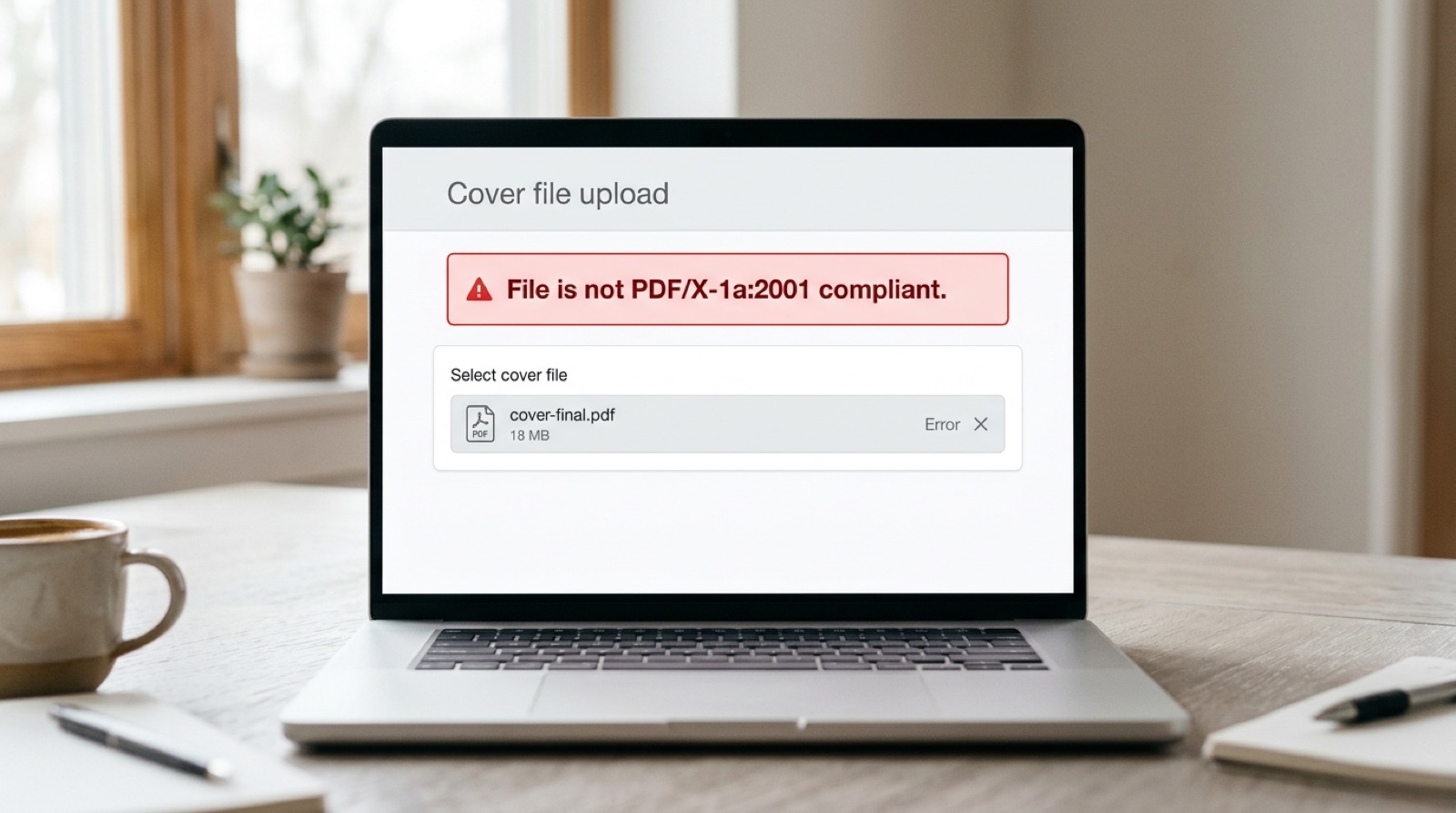
File is not PDF/X-1a:2001 compliant.
This is the single most common reason IngramSpark refuses a book file, and it is also the least helpful message the system sends, because it names a standard rather than a fault. It tells you the file failed an automated preflight check. It does not tell you which of several unrelated problems triggered it.
What PDF/X-1a actually is
PDF/X-1a:2001 is a restricted subset of PDF, published as an ISO standard and designed for one job: handing a file to a commercial press with no ambiguity about how it should reproduce. Ordinary PDF is a general purpose document format that can contain screen color, live effects, forms, scripts and fonts that are only referenced rather than included. None of that survives contact with a printing press.
PDF/X-1a strips the format back to what a press can reliably output. Every typeface must travel inside the file. Color must be CMYK or grayscale, because a press has four inks and no notion of screen red. Transparency must already be resolved into flat artwork. The file must declare which CMYK profile it was prepared for. There can be no encryption, no JavaScript, and no interactive elements.
The five conditions that fail the check
1. Fonts that are not fully embedded
Every glyph used has to be carried inside the PDF. A font that is merely referenced by name will not do, because the press does not have your font library. Partial embedding counts as failure too: if a subset was written for the body text but a heading font was skipped, the file fails.
This one has a specific trap worth knowing about. Acrobat's default Standard preset does not embed the base 14 fonts, on the historical assumption that every PDF reader already has them. A press is not a PDF reader. We have written this one up separately in why your book PDF says fonts are not embedded.
2. RGB color anywhere in the file
One RGB image is enough. So is one RGB swatch on one rule, one logo placed from a web download, or a black set as R0 G0 B0 rather than as process black. The check does not weigh how much RGB is present. It reports that RGB exists.
This is the condition authors most often miss, because RGB is invisible on screen. Your monitor is an RGB device, so RGB content looks entirely correct right up to the moment it is refused.
3. Live transparency that was never flattened
Drop shadows, glows, feathered edges, blend modes and any object with opacity below 100 percent are all live transparency. PDF/X-1a does not support them, because a press cannot interpret an instruction to blend two objects at output time. The effects must be calculated in advance and written into the file as flat artwork.
Exporting with a genuine PDF/X-1a preset flattens transparency for you. Exporting to ordinary PDF and hoping preserves it, which is why the same design can pass from one application and fail from another.
4. No declared output intent
The output intent is a small piece of metadata naming the CMYK profile the file was prepared for. Without it, the press has no reference for what your colors were supposed to look like. PDF/X-1a treats its absence as a failure rather than a warning.
You do not set this by hand. A real PDF/X-1a export writes it automatically, which is a useful diagnostic in itself: if the output intent is missing, the file was probably never exported as PDF/X-1a at all, whatever it happens to be named.
5. An export from software that is not PDF/X-1a aware
Some applications simply cannot produce this format. Microsoft Word, Google Docs, LibreOffice and Canva all export PDF, and none of them export PDF/X-1a. The file they produce may be perfectly good for reading on screen and still fail every condition above.
Why fixing the one thing you were told about often changes nothing
Because the check is a single gate with five inputs, the error message you receive describes the standard, not the cause. A file with unembedded fonts and RGB images and live transparency produces exactly the same message as a file with only one of those problems.
This is the mechanism behind the most frustrating pattern in print-on-demand publishing: you correct the thing you believe was wrong, resubmit, and the file is refused again. Nothing has gone wrong with your fix. The file simply had more than one fault, and the check stops at the gate rather than enumerating everything behind it. We have written about that cycle in why your file got rejected a second time for a different reason.
How to check compliance yourself
If you have Adobe Acrobat Pro, it will tell you exactly which conditions failed rather than making you guess.
- Open the PDF in Acrobat Pro.
- Go to Tools, then Print Production, then Preflight.
- Choose the PDF/X-1a:2001 profile and run it.
The report lists every violation individually. That list is the actual to-do list, and it is what the printer's message was standing in for.
Two further checks in the same menu are worth running while you are there. Output Preview, with "Show objects in" set to RGB, highlights every RGB element in the document. File, then Properties, then the Fonts tab lists every typeface and whether it is embedded.
Exporting correctly, by application
| Application | Can it export PDF/X-1a? | What to do |
|---|---|---|
| Adobe InDesign | Yes, natively | File, Export, Adobe PDF (Print), then choose the PDF/X-1a:2001 preset |
| Affinity Publisher | Yes | Export as PDF and select the PDF/X-1a preset; it handles the CMYK conversion |
| Adobe Acrobat Pro | Converts, does not author | Print Production, then Preflight, then the "Convert to PDF/X-1a" fixup |
| Microsoft Word | No | Export a standard PDF, then convert in Acrobat Pro or have the file prepared for you |
| Canva | No | Canva's "PDF Print" is not PDF/X-1a; the file needs converting afterwards |
| Google Docs, LibreOffice | No | Same as Word: export, then convert |
If you do not have InDesign or Acrobat Pro: converting a finished PDF to PDF/X-1a is a genuine production job, not a setting. The converter has to flatten transparency without changing the appearance, convert every RGB element to CMYK while controlling how the colors shift, embed or substitute any font that refused to embed, and attach the right output intent. Doing that badly produces a file that passes preflight and prints wrongly, which is the worst of both outcomes.
What still fails after a correct export
A clean PDF/X-1a export solves the format. It does not solve everything the printer checks. Files that are fully compliant are still refused for spine widths that do not match the page count, images below 300 DPI at final print size, text sitting outside the safe margins, total ink coverage above 240 percent, or pages exported as spreads rather than singles.
Compliance is the first gate, not the only one.
Frequently asked questions
What does PDF/X-1a:2001 compliant mean?
PDF/X-1a:2001 is an ISO standard for print-ready PDFs. A compliant file has all fonts fully embedded, uses only CMYK or grayscale color, has all transparency flattened, declares a CMYK output intent, and carries no encryption, JavaScript or interactive elements. Ingram accepts PDF/X-1a:2001 or PDF/X-3:2002 for both cover and interior files, and PDF/X-1a is the safer of the two because PDF/X-3 permits RGB and device-independent color that PDF/X-1a forbids.
Why does my file still fail after I fixed the error?
Because the compliance check is a single pass or fail gate with five separate inputs, and the message names the standard rather than the cause. A file with three faults reports the same error as a file with one. Fixing the fault you assumed was responsible leaves the others in place, so the file fails again.
Can I export PDF/X-1a from Microsoft Word or Canva?
No. Word, Google Docs, LibreOffice and Canva cannot produce PDF/X-1a. They export ordinary PDF, which may look correct on screen while failing every condition the standard requires. Those files have to be converted afterwards in Acrobat Pro or prepared by someone with production tools.
How do I check whether my PDF is PDF/X-1a compliant?
In Adobe Acrobat Pro, open the file and go to Tools, then Print Production, then Preflight, and run the PDF/X-1a:2001 profile. The report lists every violation separately, which turns the printer's single error message into an actionable list.
Does a compliant PDF guarantee my book will be accepted?
No. PDF/X-1a compliance is the first check, not the only one. Compliant files are still refused for spine width mismatches, images below 300 DPI at final size, content outside the safe margins, ink coverage above 240 percent, or pages supplied as spreads instead of single pages.
Stuck on a rejected file?
File Fix diagnoses every reason your file was refused, not just the one the printer named. Diagnosis back in three to five business days, from $99.
Get your files fixed